
What makes a thumbnail frame work
- A clear face or subject — close, sharp and facing the camera.
- Emotion — surprise, laughter or concentration beats a neutral look.
- Space for text — a less busy side of the frame where a few words fit.
- Sharpness — thumbnails are tiny; any blur makes them look amateur.
Thumbnail sizes to aim for
| Platform | Shape | Size |
|---|---|---|
| YouTube | 16:9 | 1280 × 720 |
| YouTube Shorts, TikTok, Instagram Reels | 9:16 cover | 1080 × 1920 |
| Instagram grid preview | Crops to 1:1 / 4:5 | Keep the subject centred |
A frame from a 1080p or 4K video already exceeds these sizes, so extract the frame from the file rather than taking a screenshot to keep it crisp.
How to make a thumbnail from your video on iPhone
-
Open your finished video
Share it from Photos to Video To Photo – Grab Frame, or open the app and pick the clip.

-
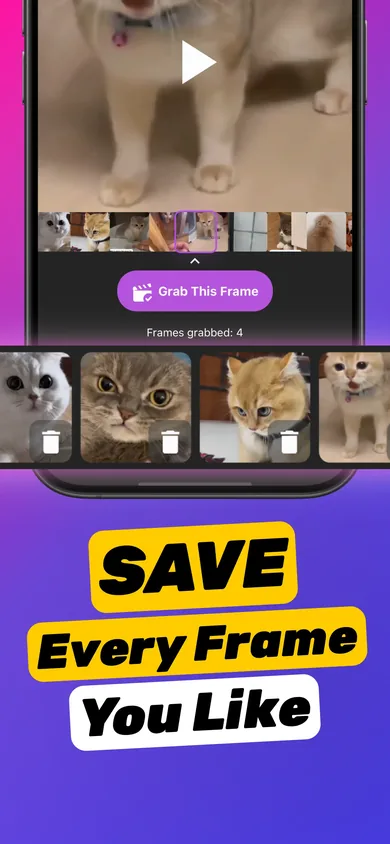
Grab 3 thumbnail candidates
Scrub to strong moments and tap Grab This Frame on each. Expressions change fast, so grab neighbouring frames too.
-
Pick the sharpest
Zoom into faces in the preview. Delete anything with motion blur or closed eyes.

-
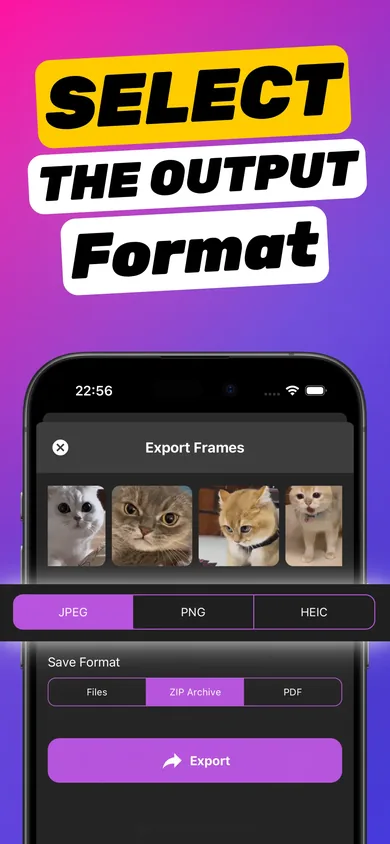
Export as PNG and add text
Export as PNG to keep quality through editing, then add a short headline in your editor and upload it as the custom thumbnail.
Try it on your own video — it takes about a minute.

Upload it as your custom thumbnail
- YouTube: in the YouTube or YouTube Studio app, edit the video's details and choose a custom thumbnail from your photos. Custom thumbnails require a verified account.
- TikTok: before posting, tap Edit cover and pick the image or a frame.
- Instagram Reels: tap Edit cover and add from your camera roll.
Tips that lift click-through
- Three to five words of text, max.
- High contrast between subject, text and background.
- Keep a consistent style across videos so viewers recognise you.
- Test two frames — swap the thumbnail after a few days and compare.
More ideas in our blog post on creating thumbnails from videos.
Frequently asked questions
Can I use a frame from my video as a YouTube thumbnail?
Yes. Extract the frame, add text if you like, and upload it as a custom thumbnail. A 1280 × 720 image in JPG or PNG under YouTube's size limit works best.
Should I export thumbnails as JPG or PNG?
Export the frame as PNG while you edit, so text stays crisp. Save the final thumbnail as JPG if you need a smaller file for upload.
Why does my thumbnail look blurry?
Usually because it's a screenshot or a frame with motion. Extract the frame from the video file and choose a moment where the subject is still.